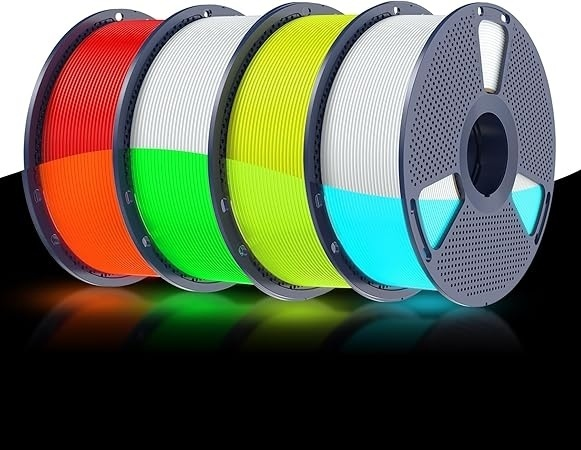
To get the best glow effect, select a suitable filament color, follow the recommended printing settings, and expose the finished model to light before displaying it in a darker environment.
Ultraviolet (UV) light can strengthen the glow effect, while prolonged direct sunlight exposure can accelerate color fading. Model shape, visible surface area, and surrounding lighting also influence the final result.
How Does Glow-in-the-Dark PLA Work?
Glow-in-the-dark filament contains phosphorescent materials that absorb light energy and emit a visible glow in dark surroundings. This gives printed objects a different appearance from conventional PLA, making the material suitable for decorative models, themed accessories, personalized gifts, and creative displays.
SUNLU offers several color variants, including Cyber Orange, Future Green, Tech Blue, Glow-in-the-Dark White (to Green), and Glow-in-the-Dark White (to Blue). These choices provide different visual effects for colorful ornaments, figurines, game accessories, and room decorations.
Which Color Suits Your Design?
Color influences how a model appears in normal lighting and when glowing. Consider whether the design calls for a colorful object during the day or a lighter base color that creates a different appearance after illumination. The shape and size of the model also affect how noticeable the glowing areas appear.
When comparing 3d print glow in the dark filaments, consider the intended display setting instead of assuming one color will always appear brighter than another. The product information lists several variants but does not establish a universal brightness ranking. Prior light exposure and ambient lighting also influence the visible effect.
Which Printing Settings Should You Use?
The SUNLU Glow-in-the-Dark PLA product page lists the following recommended printing parameters.
| Setting | Recommended value |
| Nozzle temperature at 50–100 mm/s | 200–210°C |
| Nozzle temperature at 100–200 mm/s | 210–240°C |
| Bed temperature | 50–60°C |
| Retraction distance | 0.8–1.2 mm |
| Retraction speed | 30–40 mm/s |
| Cooling fan | On |
For printing at 50–100 mm/s, begin within the recommended nozzle temperature range of 200–210°C. At 100–200 mm/s, the listed range increases to 210–240°C. Select a suitable value according to the printer and print conditions, then check extrusion consistency and surface quality.
Set the heated bed to 50–60°C and verify first-layer adhesion before scaling up. Use retraction: 0.8–1.2 mm at 30–40 mm/s. Enable cooling fans—especially for bridges, overhangs, and fine details.
How Can Model Design Contribute to the Best Glow Effect?
The model’s shape influences how its luminous features appear. Recognizable silhouettes and visible surfaces can make the effect easier to notice. Suitable projects include gaming accessories, themed figurines, costume decorations, custom keychains, personalized room ornaments, and display pieces.
A large model is not always necessary. Small objects can also create an effective visual result when their shapes remain recognizable in low light. Consider which surfaces should face the viewer and how glowing sections will contrast with the background.
Plan luminous areas with the viewing distance in mind. A keychain seen up close can use small symbols, while a wall decoration or tabletop figure may benefit from larger, simpler shapes. Contrasting backgrounds and clear spacing between glowing elements can make the outline easier to recognize when the room is dim.
For multi-color designs, use luminous filament on selected details such as symbols, outlines, or decorative elements. This allows the glow to contribute to the overall design rather than dominate every part of the object.
How Should You Store the Filament?
SUNLU recommends storing Glow-in-the-Dark PLA in a cool, dry place away from direct sunlight. Appropriate storage helps keep the filament in suitable condition between printing sessions.
Light exposure also matters after printing. Ultraviolet light can strengthen the glow effect, while prolonged exposure to direct sunlight can accelerate color fading. Consider both the storage location and the intended display environment when planning projects that use luminous filament.
What Should You Check If the Glow Seems Weak?
| Observation | Areas to review |
| Glow is difficult to see | Ambient lighting and prior light exposure |
| Fine features are hard to distinguish | Model geometry and surface detail |
| Surface looks uneven | Temperature, cooling, and extrusion consistency |
| Color changes over time | Prolonged direct sunlight exposure |
A faint-looking glow does not necessarily indicate a printing fault. Bright surroundings can make the effect harder to notice, while model shape, color, and prior illumination influence the result. Assess the finished object in the environment where it will be displayed.
How Can You Display the Model for the Best Glow Effect??
Expose the finished model to light before moving it into a darker environment. Position it so its recognizable features remain visible, and consider how the background affects contrast. The observed effect depends on the filament, prior light exposure, and viewing conditions.
For makers selecting glow in the dark filament, the available color options and recommended printing settings provide a practical basis for planning decorative projects. Matching the material to the model’s design and display environment can can help achieve the best glow effect for the model.
