A connector labeled 4K describes a signal mode, not the size of every canvas that a machine can drive. A large LED wall may be wider than 3840 pixels, may use a custom aspect ratio, or may need several independent screen regions and live layers.
The correct 4K media server size follows the total raster, output topology, simultaneous content workload, and required recovery path. Counting connectors before defining those variables can produce either an overloaded machine or an expensive configuration whose capacity remains unused.
Calculate the Native Canvas Before Counting Ports
The wall raster is obtained from cabinet pixel dimensions and the number of cabinets across each axis. A 4K media server must address that native width and height through one or more output regions. Total pixel count is useful, but maximum width, height, and permitted output geometry can impose separate limits.
An ultra-wide wall may require several feeds even when its total pixels are below the area of a standard 4K image. A layout drawing should assign exact pixel coordinates to every feed and note any maximum-width or maximum-height restriction for the proposed output mode.
Test patterns then confirm that the server, downstream processors, and cabinets interpret those coordinates identically. This geometry check is independent of whether the media decoder still has unused capacity. Each feed needs exact canvas coordinates and an assigned destination.
If a region is scaled merely to fit a connector, fine text and graphics may lose clarity. Pixel-to-pixel mapping preserves predictable geometry, while deliberate crop or fit rules can be used where the content does not match the wall. The layout drawing should state which pixels belong to every output before server capacity is selected.
Distinguish Output Raster from Decode Workload
The ability to transmit a raster and the ability to render all content layers are separate resources. A 4K media server might carry two 4K outputs while decoding several media streams, network feeds, images, and effects for the composed canvas.
Conversely, one high-resolution file may be decoded easily even though the physical wall requires several mapped outputs. Both sides of the pipeline need independent capacity checks. The worst approved scene establishes the useful benchmark.
Resolution, codec, bitrate, frame rate, number of simultaneous videos, transparency, Picture-in-Picture, and live inputs contribute to processing load. Storage throughput and thermal behavior also matter during sustained operation. A test based on a single easy clip cannot demonstrate capacity for the final show.
Read Output Groups as Routing Rules
Product specifications often divide connectors into output groups with different maximum modes. A 4K media server cannot be sized by adding every connector as though all ports were independent at their printed maximum.
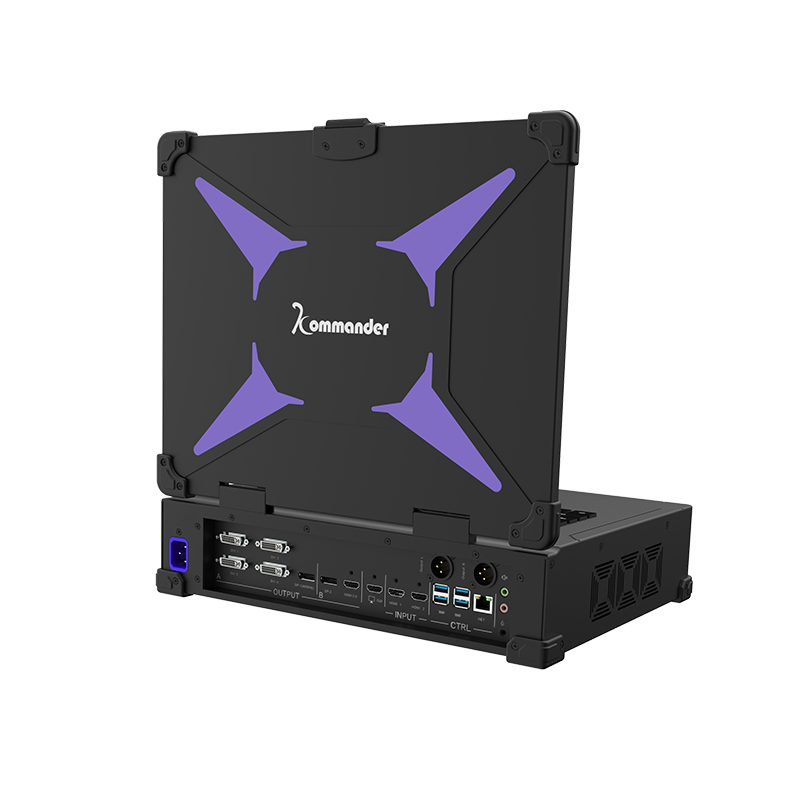
Mirrored paths, spliced groups, selectable interfaces, and shared resources must be interpreted according to the documented configuration. Kystar T1 Portable includes four independent DVI outputs up to 1920 x 1200@60Hz, with a mirrored DP output for that spliced group.
A second DP or HDMI 2.0 output group supports up to 3840 x 2400@60Hz. Under its documented 8K hardware-decoding capability, the engine can handle at least four simultaneous 4K streams or eight 2K streams. Output routing and media throughput measure different resources. A project therefore needs a port map alongside its decoding requirements instead of reducing both to one resolution figure.
Include Inputs, Storage, and Deployment Conditions
A 4K media server also has to receive assets, load projects, and fit the physical production environment. T1 Portable includes 16GB DDR5 memory, a 1TB M.2 SSD, Gigabit Ethernet, USB 3.0, audio input and output, hardware EDID locking, and a built-in 15.6-inch 1080p monitor.
The portable display and controls can simplify touring setup, while storage and network requirements still depend on media duration, bitrate, update method, and backup policy. Live capture raises another sizing dimension because input feeds consume bandwidth and rendering resources.
The specification should separate prerecorded layers from live or network sources, identify which can appear simultaneously, and state the operator preview needs. Redundancy may double certain hardware paths, but it should not be treated as extra active rendering capacity unless the system is specifically designed that way.
Physical installation can also limit an otherwise adequate configuration. Cable reach, connector conversion, rack or flight-case space, service access, cooling, and the location of operator monitoring influence how outputs are arranged.
A short, direct connection plan is easier to test and document than a design that relies on several unverified adapters. These conditions belong in the sizing record because they determine whether the calculated capacity can be deployed reliably at the venue.
Compare Compact Dual-4K and Larger Mapped Systems
Kystar KT2 represents a different 4K media server profile. Its two output channels can be configured with DP or HDMI interfaces and support point-to-point dual-4K@60Hz display output. It supports multi-window scenes, projection correction, primary/backup synchronization, NDI, web and streaming playback, and scheduled tasks.
This configuration may suit a two-feed canvas or several logical windows mapped within those feeds. The decision between one output, two outputs, or a larger server array should be made from the wall’s exact regions and the maximum simultaneous scene.
The commissioning test then runs that scene at the native output modes, checks recovery after restart, and verifies the mapped seams. The chosen platform is properly sized when the complete frame workload fits with margin and every output has a defined pixel responsibility; the 4K label alone cannot establish either condition.
